Showing posts with label computer. Show all posts

Tuesday, November 8, 2011

Maximizing the Internet bandwidth kecapatan

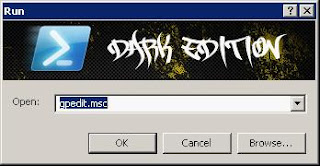
First Click and hold R + window type gpedit.msc crate image below.


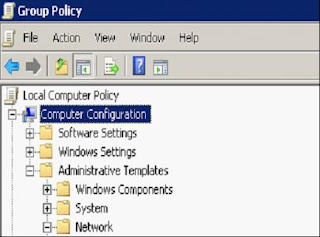
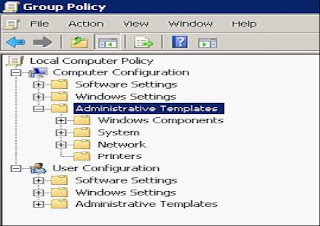
The second click OK, go to the Group Policy click computer configuration \ administrative \ templates \ Network \ QoS Packet scheduler.

Plot the image below.


after that look at the screen right. click the limit reservable bandwidth


So it looks like the following. Select the option enabled. And change bandwidth from 20% to 0%.

Click OK
Simply make it easy. hehe ..^_^

may be useful and greet bloggers.

Friday, September 17, 2010

Tips to Prevent Exploding Laptop Batteries

Exploding laptop incident is common. To mendegah for laptop batteries do not explode and cause harm, the things you should consider the following:

  1. If the battery is weak and the period of operation is reduced drastically, you better directly buy a new battery. Do not try to fix the battery that is damaged to use again.
  2. Always make sure you use the original battery from an authorized reseller. If the original battery that exploded just a lot, especially with counterfeit batteries.
  3. Do not recharge your battery more than 8 hours. Recharge the battery for too long likely to cause an explosion.
  4. If the battery is full when refilled, select a course, use electric or battery power when you want to use a laptop.
  5. Wear charger charger compatible with your battery. Charger inappropriate will increase the risk of overheating (too hot).
  6. Do not place the laptop in a very hot area, for example in the trunk or under the blazing sun.
  7. Always follow the development of technology news, such as online news sites. Usually, if there is a problem in laptop batteries, laptop vendors will conduct large-scale withdrawal. If by chance your laptop problem, you can follow the procedure prescribed. such as battery exchange

Thursday, May 20, 2010

Tips/Trik Percepat Kinerja Windows XP

We all must be happy Dunk if the computer has a fast and not too long to wait loadingnya .. right???. On occasion this time, I'll give you a little tips and tricks how to speed up windows xp performance without having to use large RAM (If it uses a large RAM I do not need to write this article Okay ... let's learn together, but keep in remember ... before you use these tips and tricks, how good your backup your registry first just in case trouble happens if later on so that we can restore the original settings of these backups.


Accelerating Access Folders - with disable Last Access Update.

If you have lots of folders and subdirectories, then access to the Directory-directory of Windows XP will be very heavy and often would be a waste of time. By updating the time stamp on the registry, namely last access updates to all sub directories. Follow the steps below:

· Choose Start> Run> Regedit

· Click "HKEY_LOCAL_MACHINE> System> CurrentControlSet> Control> File system"

· Click right on the other (empty yangg search area), and select 'DWORD Value'

· Create a DWORD Value with the name 'NtfsDisableLastAccessUpdate'

· Click right on the new values continue to select 'Modify'

· Change the data to be '1 '

· Click 'OK'


To enable non-Microsoft System Sounds

By default MS makes the computer sound systems sound / voice when the initial boot, shutdown, error, etc.. This scenario clearly sounds windows will make the computer slower (especially in the initial boot and shutdown time), for her disabled please follow these steps:

· Open the Control Panel

· Click the Sounds and Audio Devices

· Click the Sounds tab

· Choose "No Sounds" from the Sound Scheme

· Click "No"

· Click "Apply"

· Click "OK"


Speeding up boot time

A pretty cool feature of Windows XP is the ability to defragmented when it is in the process of booting. Boot Defrag on the principle of who organize the files relevant to the boot sequence. By default, this feature has been activated on several Build of Windows, but some windows build does not, it is better if we cross check against fiotur this one.

· Start Menu> Run> Regedit

· Click "HKEY_LOCAL_MACHINE> SOFTWARE> Microsoft> Dfrg> BootOpt imizeFunction"

· Find "Enable" the right side of regedit

· Click "Modify"

· Select "Y to enable"

Reboot your computer ·


Accelerating Performance swap file

If you have 256MB of ram is bigger than this sort of tweaking that will make your system run faster. This basically tweaking the PC we use every byte of physical memory installed on our computer, BEFORE using a swap file.

· Start> Run

· "Msconfig.exe"> OK

· Click System.ini tab

· Click the plus sign on the tab 386enh

· Click on the new box and then type "ConservativeSwapfileUsage = 1"

· Click OK

· Restart


Speeding up Windows Menu Loading

This waste of time tweaking the delay when we click menus and windows XP to show Menu.

· Start> Run> Regedit

· Select "HKEY_CURRENT_USER> Control Panel> Desktop"

· Select / Highlight "MenuShowDelay"

· Click right and select "Modify '

· Type the number "100" (default 400)


Loading accelerate the program.

This tweaking can walk to most programs. If the program will not load as expected, please aja restored to original settings.

· Click right on the icon / shortcut who associated with the program.

· Properties

· In the box 'target', add '/ prefetch: 1' at the end of sentences.

· Click "OK"


Speeding up Windows XP Shutdown.

This reduces waiting time tweaking it automatically when windows have received instructions for the shutdown.

· Start> Run> Regedit

· Select 'HKEY_CURRENT_USER> Control Panel> Desktop'

· Highlight 'WaitToKillAppTimeout'

· Click right and select Modify

· Change the value to '1000 '(the default 20 000)

· Click 'OK'

· Highlight 'HungAppTimeout'

· Click right and select Modify

· Change the value to '1000 '

· Click 'OK'

· Then Select 'HKEY_USERS>. DEFAULT> Control Panel> Desktop' highlight 'WaitToKillAppTimeout'

· Click right and select Modify

· Change the value to '1000 '(the default 20 000)

· Click 'OK'

· Then select 'HKEY_LOCAL_MACHINE> System> CurrentControlSet> Control' highlight 'WaitToKillServiceTimeout'

· Click right and select Modify

· Change the value to '1000 '

· Click 'OK'

good luck

Friday, April 23, 2010

CARA GAMPANG MENGHILANGKAN WINDOWS GENUINE ADVANTAGE

Windows Genuine Advantage is the windows genuine validation features that will appear warning us of course if windows is not genuine. This feature will appear if we are diligent online, so the most frequent subject of this WGA is often digunanakan laptop to get online. If not online, then of course microsoft will not be able to find out if your windows is genuine or not.

I would like to share your experience with your friends about this WGA. Last year I hit the WGA shocked windows anyway. My desktop background immediately turned black, wallpaper not appear, and display a warning Windows Genuine Advantage. Understandably I was a nerd when it really, i do not know want you doing I finally decided to reinstall. And of course lost, but so bothered anymore because all I have to install the program again.

I thought by reinstalling windows then the WGA notification was no longer appear. Eh, taxable as well. No deliberately finding friends blogs I blog walking fitting finding tutorials. Pas-ngoprek ngoprek turns out there is something wrong. WgaTray.exe can not be deleted, wgatray the task manager at the end also can not process because if the WGA endprocess it back automatically.

Now, for the friends who have experience like me. Here's easy way to remove Windows Genuine Advantage, do not need to enter regedit, task manager without going, without download hacking programs that we need to do is rename the extension from wgalogon and wgatray and 100% successful dilaptop me.
Here are the steps:

1. Open the System32 folder located at C: \ Windows \ System32

2. Find Files WgaLogon.dll rename it to wgalogon.dll.bak

3. Right-click an empty section (still in the system32 folder), select New> text document and save with the name WgaLogon.dll

4. Find the file rename it to wgatray.txt WgaTray.exe

5. Right click on the blank space and select New> Text Document saved with the name WgaTray.exe

6. LegitCheckControl.dll Rename and create a text document with the name LegitCheckControl.dll. save it in your system32 folder

7. Restart your computer.

8.
> klik kanan MyComputer >> Klik tab Automatic Update >> Pilih Turn Off" >Do not forget to turn off automatic updates>> right click MyComputer>> Click the Automatic Updates tab>> Select Turn Off

Tries Congratulations! Hopefully the WGA kenak no longer .........